Category: Work

  • On thanking

    Earlier in the Summer, we knew we were about to reach our first big Yimby milestone – raising over £1 million. This was pretty exciting for us, and we wanted to find a way to talk about it and do something to celebrate that. The obvious thing was to do some sort of press release (which we did – see coverage here and here), but we also felt that celebrating ourselves was a bit too, well, self-congratulatory and it was our users who were the ones to be celebrated. So we tried to come up with some ideas for doing something a bit different.

    At that time, my wife (she’s an awesome freelance copywriter at Wise copy) was working for a charity client on re-writing their thank you letters and I was inspired by how much of an emotional reaction I was getting from reading these letters. I hadn’t quite appreciated the stark difference between a well-written thank you letter and a, well, bog standard thank you. So it made me think – given that our users are the ones who raised £1 million, shouldn’t we be thanking them and not ourselves? Wouldn’t it be great to personally write to them, and thank them? I mean, when do you ever receive anything in the post from a website. Let alone a personal, hand written note. (All those fundraising conference sessions on DM have clearly imprinted on my subconscious too).

    Anyway, we decided it would be a good idea to write to all our successful project creators and thank them. Personally. All 500 odd of them. [Gulp]

    How to write a great thank you

    I set myself the challenge of writing the thank you letter, and having little experience of this personally, I went to the obvious first place to learn more: sofii.org. In particular, I read through all the before and after examples on the Sample thank-you letters for you to swipe page (why reinvent the wheel eh!) and tried to apply their lessons to the letter I wanted to write. I tried to focus on thinking about how I wanted the recipient to feel – which was gratitude for their efforts. And I mean genuine gratitude: we were genuinely grateful that people had used Yimby to make something good happen and I wanted to express that, and show how they had formed part of a much greater impact than they might have realised.

    My thank you letter postcard

    I originally wanted to write a letter, but that would have taken way too long, so we decided to send a postcard.

    The postcard (designed by Kate) was meant to show the range of people using Yimby and reinforce the message of *thanks*. “Thanks a million” was an obvious title to use.


    Thanks a million

    As there’s not much room on a postcard, I had to go through a few iterations to edit the letter down to its core whilst still trying to keep some impact. And here’s what we eventually went with:

    Dear [firstname],

    Because of you, and the efforts of hundreds of other people like you, over £1 million has now been raised to make hundreds of good things happen on Yimby.com.

    You were one of the first people to use Yimby, and we couldn’t have done it without you – thanks a million.

    Jonathan, Yimby Product Manager [signed from whichever member of the team wrote it]

    Ps – You can now find projects near you at Yimby.com

    Hopefully it meets and respects the rules of Lisa Sargent on sofii, but I was pretty happy with it. But then came the daunting task of writing about 500 of these -because it *had* to be hand-written to have the effect I wanted. We didn’t quite appreciate at the time that this would take *ages*, despite divvying up the work between the Yimby team (of 4-5 at that time). Not to mention the time of adding first class stamps to each postcard. I mean, we couldn’t go to all that effort to make it personal and then use franking, it just wouldn’t have felt right.

    The impact

    The goal of this wasn’t to drive visits to the site, get more pages or pledges; it was to create a feeling. Put that in your ROI pipe and smoke it!

    We knew Yimby was growing because of word-of-mouth, and that people who’d used the product were telling their friends to use it too. So if people were thanked properly (albeit not timely – that was one thing we couldn’t do as the milestone was about our platform, not their project) they would potentially be warmer to us, and tell more people. And you know what, as we wrote these cards and read the story behind every single project (personalising the copy to them if we could) it became quite an emotionally involved task: I felt every thank you that I wrote. Sincerely felt it. And if I felt it, I was sure the recipient would too.

    My ultimate goal would have been if someone stuck up a postcard on their fridge – putting us in the heart of their home – and that everyone who saw that postcard asked about it. Try measuring that digital marketers! Still, we knew that a few people might talk about their card on social, and their reaction would give us a barometer as to whether they appreciated it. In this case, success looked like appreciation. And, as you can see from the tweets, people appreciated it:

    https://twitter.com/MariceCumber/status/507630520621342720

    (despite me smudging the writing :/)

    And there were plenty more tweets too. We decided to not try and have a hashtag to pull the tweets together or have clever bit.ly links on the cards to measure clicks as it wasn’t about that, it would have felt too much like “marketing”. This wasn’t a campaign, it was a thank you. Simple as that.

    What did we learn?

    1. People appreciate being thanked (duh)
    2. There’s a knack to writing a good thank you (double duh)
    3. Hand writing thank-yous takes forever. In hindsight we might have printed the copy and hand signed each one instead.
    4. Sometimes you don’t need to worry about measuring the impact: just because you can’t measure something, it doesn’t mean it’s not worth doing
    5. Websites can do DM too: it outperformed email by a long way in this instance
    6. Doing the obvious thing is obvious. And usually easy. Thinking differently is hard, and following up on that is even harder
    7. Some of our team have terrible handwriting

    Thanks for reading 😉

    So there you have it. Inspired by a couple of Sophie’s (sofii.org and @sophdea) we thanked a few hundred people for raising over a million pounds on Yimby. And it felt great. For us, and them too.

    For more on thanking, I would recommend reading this article on How to write a better thank-you letter (and why it matters) (which I annoyingly didn’t find at the time), a new sofii article on Does thanking really work? (bet you can’t guess what the answer is) and a great post from Lisa Clavering on great and not-so-great thanking experiences.

    Thanks to Jack, Kate, Ben, Jacs, Camilla and Cat for helping to write ALL THE CARDS.

    *update*

    I forgot to give a mention to two organisations who’d send me great thank-yous recently:

    The first is Campaign Bootcamp, who wrote a lovely card based on what I’d been talking about the fundraising workshop I gave there. Ironically, I didn’t even mention thanking in it as the primary goal was to get people to feel confident in asking

    The second is Nordoff-Robins. I did an off-the-cuff fundraiser for them one afternoon, and they were in contact the next day to say thanks. And they sent a card too. Lovely. I only raised £75, yet I’ve never heard from some other charities I’ve fundraised for where I raised significantly more money.


  • On presentation skills

    Our lovely People Team (don’t call them HR) have recently started an internal learning curriculum where anyone in the office can offer to give a talk on any topic and anyone else can sign up to attend. There’s a wide range of learning on offer, from meditation and mindfulness to Excel training and intros to html and CSS. The topics are both broad and niche, if that’s technically possible. I offered to do one on presentation skills as it’s something I’m good at, I enjoy doing training and it’s something I know most people don’t like. So these are my top tips…

    My top 5 presentation tips

    1. Choose your words carefully

    You set the tone of your talk through the words you use on your slides. Be as concise as possible and choose interesting words over dull ones. It may sound obvious, but also get someone else to proof read for spelling or grammatical errors. If you’re presenting to grammar or spelling pedants, you lose them as soon as they spot a typo.

    2. Never reveal more than one line of text

    A common mistake people make is to fill slides with text. This just means half your audience will read the slides and not listen to you. And you can compound this by reading each line out, which just makes a presentation feel like someone’s reading a blog post out loud. Which is dull. Try to focus on one point at a time and bring your audience with you. Use the *appear* animation in powerpoint to stack points and reveal them one at a time.

    3. Remember the rule of three

    For this I’ll just quote wikipedia (albeit a wikipedia entry that needs a citation):

    The rule of Three is a writing principle that suggests that things that come in threes are inherently funnier, more satisfying, or more effective than other numbers of things

    4. Interact with your audience

    Make eye contact. Look around the room. Ask questions. Sitting for an hour listening to someone talk can be dull if you don’t feel like they’re engaging with you. The old “stand up if you have/do/think/believe something” trick is a good one to use. Getting people to stand up stimulates them, makes them active instead of passive and is a common way to engage with an audience.

    5. Speak slower than normal

    This is one I struggle with, and one I notice a lot of others do too. And it’s hard, as you’re usually nervous before giving a talk and the adrenaline kicks in. But when you speak quickly, it’s hard for people to catch up. Put slides in your deck to linger over and help you pause. Especially if it’s an important point. Take deep breaths as a way to slow down, and walk around if you can.

    6. Check out my slides 😉

    As I spent a long time coming up with some slides – I mean, they had to be good if I’m supposed to be the trainer! – I thought I may as well share them and see if anyone else has any good tips to add. Obviously the slides don’t mean as much without my commentary, but I’ve done a bit of editing to make it easier to follow on slideshare. And that’s another top tip – if you’re sharing slides online, do a version of the slides with more explanations so they make sense without a spoken commentary. It has lost all my fancy fonts though, so try to pretend that it looks a little bit prettier than arial… :/

    I delivered the training as a two part course, where the second part was getting people to present on something they knew about to make them feel comfortable about presenting. And the selection of presentations delivered was awesome – from the story of the F1 season so far, a guide to winter cycling and how to survive a zombie apocalypse – and it was great to see the guys take my advice on board and be much more confident presenters. Training win!

    The funny thing about putting this talk together was that I realised I often didn’t take my own advice and it made me work a bit harder on putting more structure to my talks and thinking more about the delivery. I even nabbed some slide templates from my presentation skills talk for an external talk, and you can see the before and after versions on my previous blog post.

    My fave presentation tips from others

    As for inspiration, my favourite blog post on giving presentations is probably on the Bolt Peter site – I’ve definitely taken a lot from it and I think it’s the single most useful thing anyone could read about presenting. I also found this TED talk on the structure of storytelling really compelling, but I’ve yet to manage to shoehorn in something as exciting as the iPhone launch into anything I’ve presented. Yet…


  • On social, mobile and awards

    Over the last few months I’ve given a few talks, mainly on the themes of social and mobile (with the notable exception of an awards ceremony). I’ve been talking about this theme (read: going on about it) for a while, but it’s been good to pull together a couple of presentations and a blog post to sum up my thoughts. Maybe I can start talking about something else soon instead…

    Going mobile, being social

    Anyway, here are the slides from the IoF Convention this Summer where I talked about going mobile and being social alongside Lynn Sutton from Facebook:


    And if they don’t make that much sense without a commentary, I also did an interview with Ravinol from Be Inspired Films on the topic:

    Growing your audience with mobile and social

    I also gave a similar  talk at the IoF iFundraising conference in September, trying to focus on more practical steps that charities could take on board. I blogged about these the IoF site and the JG blog as 6 tips for growing your audience on mobile and social, and the slides are below:


    During the day I gave a short interview to Rebecca from charity digital news, where I was thinking more about what I’d do if I was a smaller charity trying to take my advice. Read that over here.

    The JG Awards

    By far and away the most fun speaking gig I get to do is the JG Awards. This year was our fifth event and my fifth year MC-ing, so it feels like an old friend I only get to speak to once a year. It was another amazing night, full of incredible stories and possibly a few dodgy puns too.  Here’s the video just in case you want to see my gaffe of starting to read the announcers script instead of mine when first getting to the stage – I promise I wasn’t just saying hello to the laydeeez….


    http://new.livestream.com/accounts/864795/events/3394360/videos/63103806/player?autoPlay=false&height=360&mute=false&width=640

  • My notes from #f8 – anonymous login, mobile likes and a #sherylselfie

    I’ve been lucky enough to be in San Francisco this week for Facebook’s F8 developer conference. It’s been a really interesting experience altogether, being in the epicentre of the startup world and visiting the likes of Pinterest and Facebook’s offices to see what it’s like. But F8 was a conference on a whole new level – the scale, slickness and content were of a level I’ve not experienced before. It was a little bewildering at times, especially given the vast amount of information being shared, but I tried to capture as much content as I could using Storify, Flickr, Twitter, and (of course) Facebook so I had some notes to look back on and figure out what it meant for us.

    Facebook announced so much that it’s pretty hard to distil it, but I tried to pick out the most useful titbits for each part and storify the hell out of it. But possibly the most exciting part was saying hello to Sheryl Sandberg and getting a #sherylselfie.


    As a relatively new parent of a lovely little girl, I love what she’s doing with the #banbossy campaign: she’s a great role model for girls. But anyway, apart from that excitement, here’s all the notes I took from three chunks – the keynote, the latest on building stuff and what’s new in growth.

    Keynote notes (key notes?)


    What’s new about building stuff

    How to grow with Facebook

    So, what does that all mean?

    In the unlikely event that you’ve read this far, er, I, er, dunno. Still haven’t quite digested the epic amounts of information shared to think about the big picture. But I do know that we’ll have a fair bit of work to do off the back of this, that some things may make our lives a little harder, but plenty will make our lives easier too – and probably help us help people raise that bit extra via Facebook.

    I also know that I felt incredibly lucky to be invited and to be able to fly halfway across the world to attend. I hope I get invited back next year…

  • The JustGiving numbers behind #nomakeupselfie

    Now that we’ve had the selfies, and the blogs against selfies, and the blogs for selfies, and the blogs about what charities can learn from selfies, there’s really not much left to say about the #nomakeupselfie campaign. So I won’t bother (or perhaps leave it to my sessions at Fundraising Online or the IoF National Convention) and direct you to Madeleine’s blog for a fab collection of selfie-themed articles and blog posts to get up to speed.

    Instead, I’ll just share some numbers from JustGiving that reinforce just how powerful it was, and what a viral campaign does to your analytics. Over a million was donated on JustGiving to selfie related campaigns, which is impressive enough, but how that happened is just as interesting…

    • We saw an increase of 15,743% in the number of mobile direct donation shares compared to previous period*
    • An increase of 7,406% in the number of desktop direct donation shares
    • 30% of mobile direct donors shared their donation afterwards and 26% of desktop direct donors shared their donation (again, mobile users share more)
    • An increase of 47,331% in the amount donated from shares after a direct donation on mobile
    • An increase of 430,702% in the amount donated from shares after a direct donation on desktop
    • An increase in visits of 50%, with a a peak of 9,000 concurrent users on the site at the busiest period (22.00 on Wednesday – is your Ops team on call 24/7?)
    • Overall, 2% of desktop donations and 7% of mobile donations were made from post donation sharing to social networks – donations which would not have been made were it not for the social sharing tools tightly integrated to our donation process. This doesn’t count visits as a result of fundraising page or charity profile shares before donating, so the numbers would be even higher in reality. Sonny’s law in action
    • 51% of visits on peak day were from mobile, 36% from desktop and 13% tablet. I’d guess that’s the most mobile heavy day we’ve ever had, although January 2014 was the first month where we had more traffic from mobile alone than desktop, so it’s part of a wider trend.
    • Just under 500,000 visits from Facebook from over 11 million impressions on Facebook on Wednesday 19th alone.

    And pretty much every graph looks like the one below:

    Facebook distribution graph


    So yes, if you hadn’t realised it already, #nomakeupselfie was big. Big.

    What else can we learn?

    Build for mobile, build for shares, build to scale.

    Watch the video over on the JG blog for more.

    *All dates are from Tuesday 18th to Sunday 23rd March (the appeal spiked on Wednesday 19th) compared to previous period of Tuesday 11th – Sunday 16th March.

  • On innovations in digital fundraising

    Today I gave a presentation  to a bunch of young charity sector professionals who are part of the Charity works scheme. If you’ve never heard of it, it’s the UK charity sector’s graduate scheme and is a great thing. Check them out (and then come back here).

    As part of their training, they regularly come together to hear from various people in the sector about various things, and I was flattered to be put in touch with them by Lucy Gower (that’s @LucyInnovation to you and I) as someone who could talk about innovation in digital fundraising. Given the context was for people who perhaps haven’t had much exposure to fundraising generally, I wanted to go back to basics before showing the new shiny stuff. As basically, the new and shiny stuff is just a new way of doing the old tricks that have worked for years. In summary, it’s always about storytelling, it’s just the form of the storytelling that changes.

    Personally, I found it quite interesting to reflect on this and what I thought was innovative, and what I believe to be the big (technology) trends that digital fundraising needs to be aware of. Funnily enough, one of my starting points was Mark Phillip’s excellent collection of old charity ads on Pinterest. They are just really, really good, and point to what *good* fundraising is about, be it digital or analogue or whatever.

    So for me, the most innovative things in digital fundraising aren’t really that innovative, in a way. They just stay true to the basics of fundraising – telling a good story – and they use the opportunities new tech and digital give us to tell those stories in different, ever more engaging ways. Which is hardly a groundbreaking insight, and one I first spoke about four years ago

    As part of trying to get people to think about how they would tell their charity’s story, I took a couple of the old ads and tried to imagine how they might look if shared on Twitter. It was fun, if surprisingly hard, to take those ads and think about how they would be communicated in 140 characters. But I’d recommend it as an exercise in thinking about how to craft an elevator pitch, and is quite like a piece of advice from the head of brand at Facebook that’s stayed with me for a while – when building an app or campaign, start from the point of view of what gets shared in the newsfeed, given that’s where most people will come across your campaign (depending on the type of campaign, obviously). I’d highly recommend you read their advice.

    Hopefully the cohort who saw my talk will now think more about how they can tell their charity’s story too – be it in 140 characters, 6 seconds or over the course of a longer, integrated campaign. Ultimately, that’s what it’s about for me.

    Have a look at the slides below:


  • How to: make a donation on JustGiving using bananas

    Last September, I posed the ultimate question (and one you’ve no doubt asked many times before): can you donate using a banana?

    At the time, the answer was, “in theory”. But yesterday, after a bit of work, I made a breakthrough, and can now answer the question with a fully caps YES.

    Here’s a quick instagram video as proof:   //instagram.com/p/bysL98QElR/

    How did I do it?

    Well, assuming you care (although I guess you would have stopped reading by now if not), I needed four things:

    1. A MaKeyMaKey. I first bought mine on kickstarter, but now anyone can buy one.
    2. A pinch of arduino programming
    3. Three bananas (fair trade, naturally)
    4. Our new (awesome) one-touch donation process

    Step 1 – get your MakeyMakey

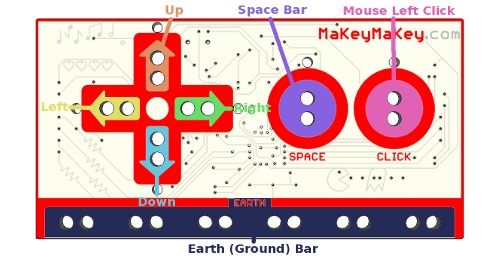
    First off, I needed to setup the MaKeyMaKey, a clever little piece of kit that enables you to use anything that conducts electricity (like, I dunno, a banana) to use as an input device for your laptop by connecting them to the board using alligator clips (like so).

    Makeymakey

    As you can see, it includes cursor keys, space and mouse click controls. By default, this would not have worked for me, as you can’t donate using these controls alone. So I had to re-program the board to use different inputs – the carriage return and tab keys. This is because you can use our new donation process to give with just a return and tab key if you’re already logged in, which is awesome, as a one-click donate process has been a goal of ours for many years.

    Step 2 – touch code (oh noes!)

    This was the tricky part. I had to download arduino (an open-source electronics prototyping platform) and follow these comprehensive instructions to install some add-ins, tweak some code and re-program the MaKeyMaKey. After a couple of failed attempts, I managed to get it to work. To be honest, after scanning the instructions, it looked a bit daunting and I nearly didn’t try, but it wasn’t that hard in the end. The instructions were ace.

    Step 3 – the potential banana skin…

    …was getting some fruit to test with. Whilst we get a delivery twice a week, it usually goes in seconds (a hungry healthy lot here) so I had to act fast. But once I commandeered some bananas from the kitchen, all I had to do was connect them to the MaKeyMaKey and log in to our test site (I’m not made of money) to try it out. And, after a few goes at trying to capture it in the measly 14 seconds you get on instagram (didn’t even bother with vine), I managed to get it to work!

    Er, what’s the point of this?

    Mainly to see if it would work. This isn’t the best reason, I’ll grant you, but hey ho – it’s all in the doing. Having said that, I backed the MakeyMakey last year on kickstarter precisely to do this sort of thing and see if I could make any fun mash-ups (literally, in the case of bananas).

    I’d quite like to test this out with some real people and see what their reaction is to using ‘different’ ways to donate, so if you have any suggestions of *things* to test to donate with (remember, must conduct electricity. And be non-weird. And legal) I’d love to hear them and maybe try them out.

  • The future of Facebook fundraising

    This is an article I wrote back in October 2012 and has just been published in the International Journal of Nonprofit and Voluntary Sector Marketing (you’ll know it as the IJNVSM). It’s predominantly based on a presentation I gave at the IoF National Convention in 2012, so some of the data is now a bit old – for the most up-to-date data check out this presentation instead – but the thoughts remain the same…

    The future of Facebook fundraising

    When people talk about Facebook in relation to charities, they often ask what the ROI is. The general perception of Facebook is that it’s not a great way to raise money, but is fantastic as a communication and community building tool. This is true, but only to a certain extent. At JustGiving, the UK’s largest online fundraising website, we have found that encouraging and enabling individual charity supporters to share their donations or updates about their fundraising events on Facebook has a great impact on amounts raised – just one share on Facebook encourages between £1 and £18 in extra donations.

    To look to the future and understand the true potential for fundraising on Facebook, it’s first necessary to look to the past. In the summer of 2007 Facebook overtook Google to become the biggest source of web traffic to JustGiving, and then at the end of 2008 Facebook started to bring us more traffic than online email. In the intervening years, Facebook has continued to grow in importance and become the primary way that people who use JustGiving to raise money for charity tell their friends about their fundraising event and ask for sponsorship.

    In 2011 alone, Facebook drove over 1 million individual donors to JustGiving, who collectively gave £22 million – of which £1 million was donated by people coming to the site from the mobile version of Facebook. By May 2012, 32% of donations on our platform came from Facebook, a 130% year on year growth. One of the ways we reacted to this growth was by building an application that people could use to donate to charity or sponsor a friend without leaving Facebook – this generated over £250,000 in the first 9 months of 2012 . Given the continuation of this growth, we expect that by 2015, 50% of donations made through JustGiving will come from Facebook.

    In a way, this growth in fundraising reflects Facebook’s own incredible growth. As of June 2012, it had 955 million monthly active users and steadily closing in on a billion users, of which 543 million users accessed the site through their mobile. In the UK, there are over 31 million active users and over half of them use the site every day. And in a study of 30,000 adults by the London Science Museum, more people would prefer to live without toilets than Facebook! (Source: The Next Web)

    So from a British perspective, the prospective audience is huge, and more importantly, hugely engaged. But how do non-profits make the most of it?

    Making the most of Facebook

    To start, organisations that have Facebook pages should make the most of its features and plan an approach that engages their online community. Advice from Facebook themselves includes setting clear guidelines about what is and isn’t acceptable to post on your wall – this will help when users veer off topic or post things you don’t approve of. It can also reduce the risk that people will leave negative comments, a fear which puts off  many first time social media users. By having clear guidelines, you can reduce that risk and give yourselves the room to ban people who don’t abide by them.

    Another useful approach is to create a ‘conversation calendar’ whereby you plan the content you will share on your page in advance. This helps create consistency of communication, as well as making sure you have a good mix of messaging – so you don’t bombard people with messages about campaigns one week and only fundraising events the next, but have a rich mix of topics that show the breadth of work your organisation is involved in.

    For more insight on using pages, see Facebook tips, Facebook studio or the Non-Profits on Facebook page.

    Share more, raise more

    At JustGiving, we have found a way to monetize Facebook by encouraging the people taking actions on our site to share them with their Facebook friends. Specifically, when someone sponsors a friend who’s taking part in a fundraising event, as soon as a donation has been successfully processed we prompt them to share a link to their friend’s fundraising page on Facebook. As some people do not like sharing how much they give to charity, or that they give to charity at all, we frame the request as a way of helping their friend raise more money. So the perception is that sharing is an altruistic act, not a way to show off their generosity.

    Whilst we promote sharing to Facebook, Twitter, LinkedIn, Google + and by email, sharing to Facebook is by far the most popular option, accounting for 90% of shares. This is not entirely surprising, given Facebook’s scale compared to the other networks and that most people will have been asked by a friend on Facebook to sponsor.

    Redeveloping our website to encourage and highlight social sharing has had a massive impact on the number of donations made, raising an extra £1 million in eight months. This is because for every share a donor makes to a social network, a certain percentage of their friends will see that message and click on a link to make another donation on JustGiving. Our data has shown that this means each share to Facebook is worth, on average, an extra £4.50. In contrast, a share to Twitter was worth £1.80 and a share on LinkedIn £3.30. From September 2011 to April 2012, Facebook sharing generated over £925,000, Twitter £55,000 and LinkedIn, £22,000.

    What has been fascinating to observe, however, is how the impact of a share on Facebook changes depending on the context of who is sharing and what they’re sharing. For example, if a donor shares a message on Facebook about them donating directly to a charity, it is worth £1 per share, but if someone shares a message about donating to a friend’s fundraising page, it is worth around £5. But if a fundraiser (ie, someone taking part in a fundraising event for a charity) themselves shares a text update about their event, it is worth around £12 per share. And then if the fundraiser records a video about their event and shares that, the average value per share increases to £18.

    In each instance, the content that is shared appears in a Facebook newsfeed in broadly the same way, but the motivation and interest of the messages is totally different. It may be self-evident on reflection that individuals in a social network are more likely to respond to someone doing something for a charity (that the network may or may not be interested in) than a person just donating to a charity (that the network may or may not be interested in), but the way we built our product and tracked the data proves that this is actual behaviour. This could be summarised as ‘the greater the effort of the individual, the greater the response from their network’.

    So what does this mean for charities wanting to use Facebook to raise money? Well, it proves that encouraging people to share their charitable actions on Facebook can help you raise more money. And that the impact of sharing varies a lot depending on the type of content being shared, so more care should be taken on how people are encouraged to share.

    Most non-profits will have a way of accepting donations online, but very few of those processes actively encourage the donor to share their donations with friends. It is clearly beneficial to prompt those donors to share their donation on social networks, but it’s important to frame that request as a way of helping the charity raise more money from their friends and not as a way of ‘showing off’. Given that each Facebook user has an average of 130 friends, just one share could reach many people that the charity doesn’t have access too – and the message may be more effective coming from that friend than from the charity itself. In addition, non-profits should encourage people to add more content to these shares – to say ‘why’ the donor gave to that charity, sharing the interesting story that motivated the donation. Encouraging donors to share their motivation will make their share on the social network much more interesting and engaging to their network and increase the impact of that share.

    Many websites enable people to share their site on Facebook or Twitter without thinking about what content is being shared. Just sharing a link and a title of a webpage isn’t going to be very interesting to the network of the person who’s sharing, so you have to both think about how to encourage the ‘sharer’ to share, and what content is going to most engage the friends of that ‘sharer’.

    To summarise, after every action someone takes on a non-profit website, whether it’s making a donation, signing up to a newsletter or registering for an event, they should be prompted to tell their friends on social networks that they did it and equally importantly why they did it.

    Where next for social sharing?

    The future for social sharing is already changing, thanks to a feature Facebook introduced at the start of 2012 – Timeline. The Timeline is a way individuals can collate all their activity on Facebook in chronological order, but it also enables application developers to add more richness to the experiences they create. Before 2012, users could only ‘like’ or ‘recommend’ things on Facebook, but Timeline allows app developers to create their own vocabulary on Facebook that more accurately describes the actions a user is taking. It also shares the content in more places on Facebook: as well as posting content in the newsfeed like most shares, the stories are shared in the ticker and on a user’s Timeline.

    For example, by connecting the music streaming service Spotify to Facebook, you can share a ‘song’ you’re ‘listening’ to, or by using the Guardian newspaper’s social reading app, you can share an ‘article’ you’re ‘reading’. In both these examples, you can set-up the app to share on your behalf so the act of listening becomes the act of sharing, and the act of reading becomes the act of sharing; you don’t have to click a ‘share’ button to tell your friends what you’re reading or sharing. Thanks to this integration, both the Guardian and Spotify experienced huge uptakes in their user base, with the Guardian going from 0 to 3.9 million active users in just a couple of months. (Source: Facebook developer blog).

    Facebook launched JustGiving’s integration in April 2012, which allows users to share the ‘donations’ they’ve made, enables fundraisers to share ‘thanks’ to their sponsors and gives people a way to ‘remember’ someone who’s passed away, on their Timeline. (Source: Facebook developer blog). In this case, the act of clicking a ‘thank’ button on JustGiving creates a story on Facebook that you ‘thank’ that sponsor, and by connecting their JustGiving and Facebook accounts, every time someone donates, a story is automatically shared on Facebook sharing the donation. All these actions are then aggregated on a user’s Timeline, showing the friends they have supported, the charities they have donated to, and the people they have thanked.

    Open graph integration (since changed)

    These aggregations are only available if you integrate with Timeline – they add richness to a user’s history with your app, showing their friends what they’ve done in a more interesting way than a single story. Since adding our Timeline integration, we’ve seen the number of referrals from user’s Timelines be almost as much as the referrals from the newsfeed. This was surprising, but it shows that Facebook users do look at other’s profiles and find the content that’s aggregated there from Timeline applications interesting enough to click on and take the same actions themselves.

    The growth of mobile

    One other way we have seen Facebook’s impact on fundraising change has been the growth of people accessing Facebook from their mobile devices. As quoted earlier, 543 million people access Facebook every month using their mobile, and this number is growing steadily. Understanding the impact of mobile optimisation as a general trend in online fundraising is important, especially in relation to social networks.

    The growth of mobile visits to JustGiving has increased massively over the last three years, from 6% in April 2010 to 15 % in April 2011, up to a massive 32% in April 2012. Building a mobile experience for those users has helped to increase conversions by those users, but the main driver of that growth is social networks, and especially Facebook. In April 2010, mobile Facebook accounted for only 0.18% of visits to JustGiving. That grew to 4% in April 2011, but by April 2012 it was responsible for bringing 11% of all traffic to JustGiving. That’s a massive growth in a short space of time, and so we are trying to give those users who come from mobile Facebook a better experience – this will be a key challenge for the future.

    One thing we have done is encourage mobile users to share their donations on Facebook, and whilst this doesn’t have the same volume as those sharing from our desktop site, it’s still generating a reasonable impact and is growing more every month. In September 2012, sharing by sponsors to Facebook on our desktop site brought in almost £140,000, whereas sharing from our mobile site brought in £27,000. We expect these numbers to start to converge over time as people become more familiar with transacting on mobile devices and technology makes this type of sharing easier for the end user.

    In summary

    Facebook is the world’s largest social network and its scale and influence cannot be ignored. In relation to fundraising, we may not yet have reached a point where charities can actively raise significant funds themselves, but their supporters certainly can. By encouraging supporters to share donations or their relationship with charities on Facebook, it can and will bring in extra donations from the friends of those supporters. It’s key to both encourage sharing andthink about what gets shared by supporters too.

    For those non-profits who have the technical capabilities, through partners or in-house development teams, Facebook Timeline gives a new and powerful way to enable sharing by doing – to add a rich layer of context and interest that makes Timeline stories and their aggregations relevant and impactful. With the recent launch of native Facebook integration in the latest Apple operating system release (iOS 6), adding a social layer to mobile experiences is now even easier and will become ever more the norm. The future is undoubtedly mobile, so understanding people’s behaviour on mobile, making the experience optimised, easy-to-use and above all social, will be essential for the non-profit looking to the future of Facebook fundraising.

  • Highlights from #iofnc 2013 – multi-channel, innovation, mobile

    I’ve been lucky enough to be at the Institute of Fundraising’s National Convention (#iofnc) this week, learning from the best minds in the UK charity sector. It’s always a great opportunity to meet fundraising friends IRL, but there have been lots of great sessions too.

    If i had to try and summarise the key trends from the last three days (from the sessions I went to), they would be…

    • Multi-channel fundraising is a must. You can’t stick to one way of talking to people anymore.
    • Innovation is more important than ever, but you have to be prepared to fail to innovate. It’s all about testing,  learning and continually iterating (and will be more and more about lean startup methodology, I suspect)
    • Mobile is a necessity, not a luxury. It’s here now, not a future trend. It also helps you simplify your products and propositions. But it’s not necessarily the holy grail in itself (see trend #1)

    To try and be more organised this year, I’ve used storify to collect mine and others’ notes on the presentations I’ve attended, and these were my top 3 highlight sessions…

    • Innovation in giving with @reubenturner and @wordofjoe
    • Mobile and digital journey at UNICEF with @spirals
    • Dryathlon and click to cure with Cancer Research UK

    I’ve embedded the relevant storifys of each session for your delectation below…

    http://storify.com/jon_bedford/bits-and-bobs-from-the-iofnc-day-2-part-2

    http://storify.com/jon_bedford/bits-and-bobs-from-the-iofnc-day-1-part-2

    And Laila’s slides below:

    http://storify.com/jon_bedford/bits-and-bobs-from-the-iofnc-day-2-part-1

    I also shared plenty more notes from sessions on crowdfunding, shaking the digital tin, the opening plenary and online video, and more

    This year I also had the pleasure of working with Merlin’s Danielle Atkinson and PayPal Giving Fund’s Nick Aldridge to put together the digital stream for the Convention, so if you do have any feedback on the digital sessions and would like more or less of certain things, drop me a line on twitter or email.

  • On Storify: a conference must

    I’ve been finding storify a really great tool for note-taking at conferences recently, as it gives you an easy way to collect your own, and more importantly, others’ thoughts together around a topic. Too many times I look in my iPhone notes app and find useful (but random) things I noted down and meant to take action on that I never did.

    It’s the same at most conferences I’ve been to, and I’ve been to a lot (as my collection of lanyards testifies): you might jot down the odd idea or url to follow up, but I never get round to writing things up and sending them round the team. With storify, especially the pretty slick iPad app, pulling all that content together is easy so the effort to share it later and collate learnings is simple. The way you can pull in a stream of tweets on a particular hashtag and pull them into your story, complete with images, just makes that *curation* super simple.

    Storify has been really useful for a couple of quite different events in the last few months: from pure note taking from barcampnfp (a marked improvement on note taking through the blog) to collecting mine and others’ views of the morning and afternoon sessions from the recent Facebook mobile developer conference. Having captured all that great info of the Facebook talks in particular, I shot out an email to the whole team sharing what I’d learnt before the end of the day, and I then re-used a lot of that content to tell a longer story of what Facebook integration we should be looking at next too: note taking that helped me do actual work – win!

    Oh, and here’s me on storify in the unlikely event you want to follow the collection of notes I take from random conferences.

    And if you’re interested in how Facebook approach mobile dev and their latest user stats, storify yourself up!
    http://storify.com/jon_bedford/facebook-mobile-dev-conference